Get the Epson SureColor F570 if:
- You need 24 in wide or long roll prints.
- You want ink bottles and an automatic cutter.
- You have the floor or bench space.
Sublimation printers · Comparison
The short answer
Our overall pick for most desks: the Sawgrass SG1000. Pick the Epson F570 only if you need prints wider than 13 in.
24 in wide prints from a roll? F570
Smaller printer, longer warranty? SG1000
These sit at different sizes. The F570 is a 24 in roll-and-sheet printer with an automatic cutter and 140 mL ink bottles, about 38 in wide. The SG1000 prints 11 x 17 in from its tray (13 x 19 in with the optional bypass tray), uses 31 mL or 70 mL cartridges, is 21 in wide, and carries a 3-year or 100,000-print warranty against Epson’s 1 year. For most desktop setups the SG1000 is the simpler fit.
Best for wide-format prints
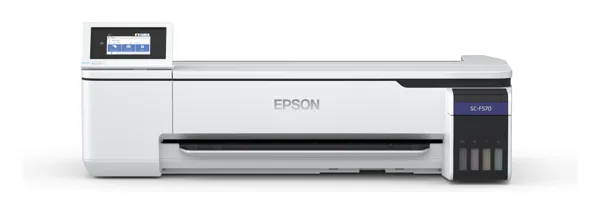
Full Epson SureColor F570 review
The Amazon listing we found is a dealer bundle with an ink set, sold and shipped by a third-party seller (JPPlus). Its details show model SCF571 while the title says SCF570, and it doesn’t say standard or Pro, so check the model and what’s included.
See the F570 bundle on AmazonBest for a desktop setup
The Amazon listing is the SG1000 bundle with 31 mL inks and paper, model SG1000 (110/120 V), sold by Sawgrass Technologies. The listing contradicts itself on warranty (3 years in the title, 2 in the bullets); Sawgrass’s FAQ says 3 years or 100,000 prints for purchases on or after Oct 1, 2025.
See the SG1000 on AmazonBefore you buy: The only F570 Amazon listing we found is a third-party dealer bundle with mixed model numbers (SCF570 in the title, SCF571 in the details), so it gets a text link, not a button. Epson sells a standard F570 and an F570 Pro; this page uses standard-model specs where they differ. Neither maker publishes an ink yield. Listings change, so check the model, seller and contents before you order.
As an Amazon Associate I earn from qualifying purchases.
The F570 wins on print width, the cutter and ink capacity. The SG1000 wins on size, weight and warranty. Print speed, ink cost per print and connections can’t be compared from the makers’ data.
A green check marks the clearly better spec for most people. No check means a tie, a gap that depends on how you work, or a spec marked Unknown. Figures come from Epson and Sawgrass spec sheets and FAQs; dealer and Amazon-only facts are labeled.
| F570 | SG1000 | |
|---|---|---|
| Max print width | 24 in roll and sheet (paper 210 to 620 mm) | 11 x 17 in tray; 13 x 19 in with optional bypass |
| Cutter and feed | Built-in rotary cutter; 50-sheet auto-feed tray | 200-sheet tray (dealer spec) |
| Resolution (maker spec) | 2,400 x 1,200 dpi | Up to 4,880 x 1,200 dpi |
| Ink | T49M UltraChrome DS bottles, 140 mL CMYK | SubliJet UHD or VersiFlex cartridges, 31 mL (70 mL extended) |
| Ink yield | Unknown | Unknown |
| Speed | Unknown | 15 s to 6 min 40 s per sample image by mode (Sawgrass brochure) |
| Connections | Wi-Fi (full list Unknown) | USB, Ethernet, 2.4 GHz Wi-Fi |
| Software | Epson drivers; Epson Edge Print Pro with the F570 Pro only | Sawgrass Print Utility, MySawgrass |
| Size | 38.2 in wide (970 x 577 x 245 mm) | 21 x 14.25 x 8.5 in |
| Weight | 64 lb (29 kg) without stand | About 33 lb (15 kg) |
| Power | 110 to 240 V; about 22 W printing | 120 V; 53 W (dealer spec) |
| Noise | About 50 dB(A) operating | Unknown |
| Warranty | 1 year limited (extended plan to 2 years) | 3 years or 100,000 prints (bought on or after Oct 1, 2025) |
Common sublimation jobs, judged only from the makers’ media sizes, cutter and connection specs.
| Job | F570 | SG1000 |
|---|---|---|
| Print size | ||
| Letter or 11 x 17 in transfer | Can doSheets from 210 mm wide. | Can do11 x 17 in main tray. |
| 13 x 19 in transfer | Can do24 in wide media. | Just barelyNeeds the optional bypass tray. |
| 24 in wide or long roll prints | Can do24 in roll with built-in cutter. | Can’t13 in max width; 13 x 51 in with bypass per dealers. |
| Setup | ||
| Wired network | Can’tNot listed in the specs we found. | Can doEthernet. |
| Fits on a normal desk | Just barelyAbout 38 in wide, 64 lb. | Can do21 in wide, about 33 lb. |
Sources: Epson SureColor F570 and F570 Pro spec sheets and product-page text (epson.com was in maintenance on October 16, 2026); Sawgrass SG1000 brochure, Sawgrass FAQ, SG500/SG1000 user guide and dealer spec sheets. Checked October 16, 2026.
As an Amazon Associate I earn from qualifying purchases.
Skip it if your prints fit 13 x 19 in; it’s much bigger and heavier, and its warranty is 1 year against 3.
Skip it if you need prints wider than 13 in; its main tray is 11 x 17 in.
The F570 takes 24 in roll and sheet media. The SG1000 prints 11 x 17 in from its tray and 13 x 19 in with the optional bypass tray.
The SG1000: 3 years or 100,000 prints for purchases on or after Oct 1, 2025, per Sawgrass. The F570 has a 1-year limited warranty, extendable to 2 years.
Neither maker publishes an ink yield, so we can’t say. The F570 uses 140 mL bottles; the SG1000 uses 31 mL or 70 mL cartridges.
The listing we found is a dealer bundle sold by a third-party seller, JPPlus, with mixed model numbers. Check the model and contents before ordering.