Get the Epson SureColor F170 if:
- You print tumbler wraps or other long transfers.
- You want ink bottles in a tank.
- You want to keep printing longer designs later.
Sublimation printers · Comparison
The short answer
Our overall pick: the Epson SureColor F170, but it’s close. The rows are tied 2 to 2, and the F170 gets the nod for print length: up to 47.2 in against about 14 in. Pick the Brother SP1 if your prints fit Legal and you want the smaller footprint and longer warranty.
Long prints and big ink bottles? F170
Smaller desk, longer warranty? SP1
Both are 4-color, 8.5 in wide desktop sublimation printers with USB, Ethernet, Wi-Fi and Wi-Fi Direct. It’s close: the rows are tied 2 to 2. The F170 wins on print length (47.2 in against about 14 in) and 140 mL ink bottles; the SP1 wins on footprint and a 2-year warranty against Epson’s 1 year. The F170 is the pick because print length is the one difference that decides what you can make: the SP1 can’t print anything longer than Legal.
Best for long prints and ink capacity
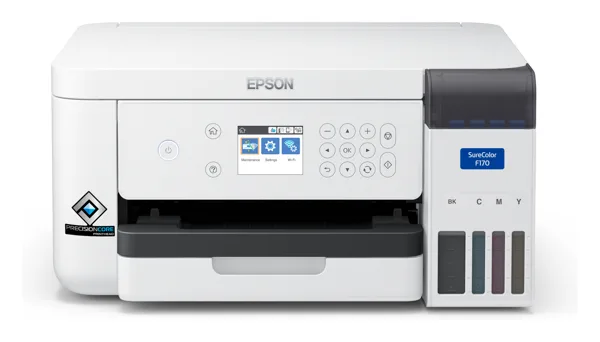
Full Epson SureColor F170 review
When checked on October 16, the featured offer was from a third-party seller (JPPlus), not Amazon or Epson. Check the seller and that it’s new before you order.
See the F170 on AmazonBest for a small desk and a longer warranty
Sold by Amazon.com when checked on October 16. Use this listing, not the separate “Brother SP1” listing without a featured offer or the bundle.
See the SP1 on AmazonBefore you buy: The F170’s featured offer on Amazon was from a third-party seller (JPPlus) when checked on October 16; the SP1 was sold by Amazon.com. Several SP1 figures (print size, resolution, speed) come from Brother’s non-US pages. Check the seller and model before you order.
As an Amazon Associate I earn from qualifying purchases.
Tied 2 to 2. The F170 wins on print length and ink capacity. The SP1 wins on footprint and warranty. Weight isn’t scored (see notes). Resolution, speed and software can’t be compared fairly from the makers’ data.
A green check marks the clearly better spec for most people. No check means a tie, a gap that depends on how you work, or a spec marked Unknown. Figures come from Epson and Brother; SP1 figures from Brother’s non-US sites are labeled.
| F170 | SP1 | |
|---|---|---|
| Max print size | 8.5 x 47.2 in | About 8.5 x 14 in (215 x 355 mm); A4, Letter, Legal, custom (non-US Brother) |
| Resolution (maker spec) | 1,200 x 600 dpi | Up to 1,200 x 2,400 dpi (non-US Brother) |
| Speed | Unknown | Up to about 45 s per sheet, by mode (non-US Brother) |
| Ink | 4-color CMYK T49M bottles, 140 mL each, ink tank | 4-color CMYK cartridges, 47 mL each |
| In the box | Printer, 4 x 140 mL inks, maintenance box, power cord | Printer, 4 x 47 mL inks, 10 sheets of sublimation paper, quick guide; no USB cable |
| Connections | Hi-Speed USB, Wi-Fi b/g/n, Wi-Fi Direct, Ethernet | USB 2.0, Ethernet, 2.4 GHz Wi-Fi b/g/n, Wi-Fi Direct |
| Software | Epson print software | Artspira app (100 sublimation designs, image conversion) |
| Size (W x D x H) | 14.8 x 19.8 x 7.4 in (printing) | 17.1 x 13.5 x 6.2 in |
| Warranty | 1-year unit exchange | 2-year limited warranty and replacement service |
Common sublimation jobs, judged only from the makers’ media sizes, ink and connection specs.
| Job | F170 | SP1 |
|---|---|---|
| Print size | ||
| Letter transfer (8.5 x 11 in) | Can do8.5 in wide. | Can doLetter supported. |
| Legal transfer (8.5 x 14 in) | Can doUp to 47.2 in long. | Can doLegal supported. |
| Long transfer, e.g. 8.5 x 20 in | Can doUp to 47.2 in long. | Can’tAbout 14 in max length. |
| Setup | ||
| Wired network | Can doEthernet. | Can doEthernet. |
| Print straight out of the box over USB | Can doHi-Speed USB; cable not listed in the box. | Just barelyUSB 2.0, but no USB cable in the box. |
Sources: Epson SureColor F170 specs (as used on the SG500 vs F170 page); brother-usa.com SP1 page (box contents, size, warranty); Brother Singapore SP-1 page and Brother South Africa SP1 PDF (print size, resolution, connections, weight, speed). Checked October 16, 2026.
As an Amazon Associate I earn from qualifying purchases.
Skip it if you want more than a 1-year warranty, or if your desk is shallow: it’s 19.8 in deep while printing.
Skip it if you print longer than about 14 in, or if you need a USB cable in the box: Brother doesn’t include one.
The F170, up to 8.5 x 47.2 in. The SP1 tops out at about 8.5 x 14 in (Legal).
The SP1: 2-year limited warranty with replacement service. The F170 has a 1-year unit exchange.
Neither maker publishes an ink yield, so we can’t say. The F170 uses 140 mL bottles; the SP1 uses 47 mL cartridges.
No. Brother lists no USB cable in the box. It also connects over Wi-Fi and Ethernet.