Get the Bambu Lab P1S if:
- You don’t need carbon- or glass-fiber filaments.
- You want the lower peak power draw.
- You want the lighter printer.
3D printers · Comparison
The short answer
Our overall pick: the Bambu Lab P2S. It does everything the P1S does and adds carbon-fiber filaments, a hotter bed and a better camera.
Lighter, lower peak power? P1S
Carbon-fiber filaments, sharper camera? P2S
Same 256 mm build volume and 300°C top nozzle temperature. The P2S raises the top speed to 600 mm/s and the bed to 110°C, ships with a hardened-steel 0.4 mm nozzle, lists carbon- and glass-fiber filaments, adds VOC and particulate filtration, and upgrades the camera to 1080p at 30 fps. The P1S is lighter and peaks at 350 W at 110 V against 1000 W for the P2S during heat-up.
Best for lower power draw
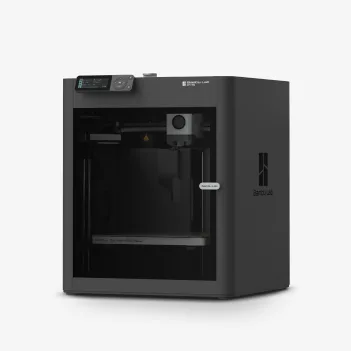
The Amazon listing (item model P1S) is sold by Bambu Lab Store. It also offers a P1S Combo with AMS; pick the plain P1S if you don’t want the AMS.
See the P1S on Amazon Check the P1S at BambuBest for engineering filaments
The Amazon listing (machine only) is sold by Bambu Lab Store and ships from Amazon. The base P2S prints one color; the Combo adds AMS 2 Pro.
See the P2S on Amazon Check the P2S at BambuBefore you buy: The P2S draws up to 1000 W at 110 V for 3 to 5 minutes while heating, about 200 W steady when printing PLA. The base P2S prints one color; the Combo includes AMS 2 Pro.
As an Amazon Associate I earn from qualifying purchases. I may also earn a commission from Bambu Lab links.
The P2S wins on speed, bed temperature, nozzle, filaments, filtration and camera. The P1S wins on peak power, weight and size.
A green check marks the clearly better spec for most people. No check means a tie, a gap that depends on how you work, or a spec marked Unknown. Figures come from Bambu Lab’s spec pages and wikis; Amazon-only facts are labeled.
| P1S | P2S | |
|---|---|---|
| Build volume | 256 x 256 x 256 mm | 256 x 256 x 256 mm |
| Max speed | 500 mm/s | 600 mm/s |
| Acceleration | 20,000 mm/s² | 20,000 mm/s² |
| Max flow | Unknown | 40 mm³/s (ABS at 280°C) |
| Max nozzle temp | 300°C | 300°C |
| Max bed temp | 100°C | 110°C |
| Nozzle | 0.4 mm stainless (0.2/0.6/0.8 optional) | 0.4 mm hardened steel (0.2/0.4/0.6/0.8 supported) |
| Extruder | Direct drive | PMSM extruder motor, hardened-steel gear, built-in filament cutter |
| Filtration | Activated carbon filter | Activated carbon, VOC and particulate filtration |
| Multi-color | AMS / AMS 2 Pro, up to 16 colors | AMS 2 Pro in the Combo; base P2S is single-color |
| Filaments | PLA, PETG, TPU, PVA, PET, ABS, ASA (PA, PC capable) | Those plus PA, PC and carbon- and glass-fiber grades |
| Camera and sensors | 1280 x 720 at 0.5 fps; runout; power-loss recovery | 1920 x 1080 at 30 fps; door, runout, tangle and odometry (with AMS); power-loss recovery |
| Screen | Unknown | 5 in touch, 854 x 480 |
| Connections and storage | Wi-Fi (details Unknown) | Dual-band Wi-Fi, no Ethernet; 8 GB eMMC + USB |
| Max power at 110 V | 350 W | 1000 W during 3 to 5 min heat-up; about 200 W steady (PLA) |
| Size | 389 x 389 x 458 mm | 392 x 406 x 478 mm |
| Weight | 12.95 kg (28.6 lb) | 14.9 kg (32.8 lb) |
| Warranty | Unknown for the US (1 year on Bambu Lab’s Asia store) | Unknown |
Common print jobs, judged only from Bambu Lab’s build volume, bed temperature and filament lists.
| Job | P1S | P2S |
|---|---|---|
| Filaments | ||
| PLA, PETG, ABS or ASA | Can doListed as ideal. | Can doListed as supported. |
| PA or PC | Just barelyListed as capable, not ideal. | Can doListed as supported. |
| Carbon- or glass-fiber filament | Just barelyNot recommended without a hot end and extruder upgrade. | Can doCF and GF grades listed; hardened-steel nozzle included. |
| Extras | ||
| Multi-color prints | Just barelyNeeds an AMS. | Just barelyNeeds AMS 2 Pro (in the Combo). |
| Watch prints remotely | Just barely720p camera at 0.5 fps. | Can do1080p camera at 30 fps. |
| Wired network | Can’tNot listed. | Can’tNo Ethernet. |
Sources: bambulab.com/en-us/p2s/specs and the P2S wiki FAQ; store.bambulab.com P1S page, bambulab.com/en-us/p1, Bambu Lab’s P1S Quick Start PDF and the Bambu wiki P1 FAQ. Checked October 16, 2026.
As an Amazon Associate I earn from qualifying purchases. I may also earn a commission from Bambu Lab links.
Skip it if you plan to print carbon- or glass-fiber filaments; Bambu Lab doesn’t recommend them on the stock P1S.
Skip it if you only print PLA and PETG and want the lower 350 W peak power draw of the P1S.
Bambu Lab lists 600 mm/s for the P2S and 500 mm/s for the P1S, with the same 20,000 mm/s² acceleration.
Bambu Lab doesn’t recommend carbon- or glass-fiber filaments on the P1S without a hot end and extruder upgrade. The P2S lists them and ships with a hardened-steel nozzle.
Not on its own. Multi-color needs AMS 2 Pro, included in the P2S Combo.
It peaks at up to 1000 W at 110 V for 3 to 5 minutes while heating, against 350 W max for the P1S. Bambu Lab lists about 200 W steady for PLA on the P2S.